実践的ノウハウ
読了時間
約 20 分
#CrewAI#AIエージェント#マルチエージェント
CrewAI実践ガイド【マルチエージェントAI開発フレームワーク2025】
2025年、CrewAIはマルチエージェントAI開発の標準フレームワークとして、$18M調達、10万人以上の認定開発者、Fortune 500の60%採用という驚異的な成長を遂げています。本記事では、CrewAIの実践的な使い方を徹底解説します。
CrewAIとは

マルチエージェントシステムの革命
従来のAI:
1つのAIが全てのタスクを処理
↓
限界: 複雑なタスクで精度低下

CrewAI:
複数の専門AIが協力してタスクを処理
↓
結果: 各AIが得意分野を担当 → 高精度
基本構成要素
| 要素 | 説明 | 例 |
|---|---|---|
| Agent | 役割を持つAI | リサーチャー、ライター |
| Task | 実行するタスク | 情報収集、記事執筆 |
| Tool | Agentが使う道具 | Web検索、ファイル読み書き |
| Crew | Agentの集まり | 編集チーム |
インストールと基本
セットアップ
# インストール
pip install crewai crewai-tools

# 依存関係
pip install langchain openai
最小構成の例
from crewai import Agent, Task, Crew
from crewai_tools import SerperDevTool

# Tool定義(Web検索)
search_tool = SerperDevTool()

# Agent定義
researcher = Agent(
    role='リサーチャー',
    goal='最新のAIトレンドを調査する',
    backstory="""
    あなたは10年の経験を持つAIリサーチャーです。
    最新技術の動向を追跡し、正確な情報を提供することが得意です。
    """,
    tools=[search_tool],
    verbose=True
)

writer = Agent(
    role='ライター',
    goal='分かりやすい技術記事を書く',
    backstory="""
    あなたはテクニカルライターです。
    複雑な技術を一般の人にも理解できるように説明することが得意です。
    """,
    verbose=True
)

# Task定義
research_task = Task(
    description='2025年のAIトレンドトップ5を調査してください',
    agent=researcher,
    expected_output='AIトレンドのリストと各トレンドの詳細説明'
)

writing_task = Task(
    description='''
    リサーチ結果をもとに、ブログ記事を書いてください。
    - タイトル
    - 導入文
    - 各トレンドの解説(300文字以上)
    - まとめ
    ''',
    agent=writer,
    expected_output='完全なブログ記事(Markdown形式)'
)

# Crew作成
crew = Crew(
    agents=[researcher, writer],
    tasks=[research_task, writing_task],
    verbose=2
)

# 実行
result = crew.kickoff()
print(result)

実践例1:自動記事生成システム
システム構成
Agent構成:
1. Researcher(リサーチャー)
2. Analyst(分析者)
3. Writer(ライター)
4. Editor(編集者)

ワークフロー:
Researcher → Analyst → Writer → Editor
完全実装
from crewai import Agent, Task, Crew, Process
from crewai_tools import SerperDevTool, FileReadTool, ScrapeWebsiteTool
# Tools
search_tool = SerperDevTool()
scrape_tool = ScrapeWebsiteTool()
file_tool = FileReadTool()
# Agent 1: リサーチャー
researcher = Agent(
role='Senior Researcher',
goal='最新かつ正確な情報を収集する',
backstory="""
20年の経験を持つリサーチャー。
Google Scholar、arXiv、業界ニュースを横断的に調査し、
エビデンスに基づいた情報提供を行う。
""",
tools=[search_tool, scrape_tool],
verbose=True
)
# Agent 2: アナリスト
analyst = Agent(
role='Data Analyst',
goal='収集した情報を分析し、トレンドを抽出する',
backstory="""
統計学とデータ分析のエキスパート。
大量の情報から重要なパターンとインサイトを発見する。
""",
verbose=True
)
# Agent 3: ライター
writer = Agent(
role='Content Writer',
goal='魅力的で読みやすい記事を作成する',
backstory="""
SEO最適化された技術記事を書くプロ。
複雑な技術を誰でも理解できるように説明する。
""",
verbose=True
)
# Agent 4: 編集者
editor = Agent(
role='Editor-in-Chief',
goal='記事の品質を最終確認し、完成させる',
backstory="""
大手メディアで10年の編集経験。
文法、構成、SEO、読みやすさを総合的にチェックする。
""",
verbose=True
)
# Tasks
task1 = Task(
description="""
「生成AI 2025年トレンド」について徹底的にリサーチしてください。
以下を含めてください:
- 主要な技術トレンド(5つ以上)
- 各トレンドの詳細情報
- 統計データ
- 専門家の意見
- 信頼できる情報源のURL
""",
agent=researcher,
expected_output='詳細なリサーチレポート(3,000文字以上)'
)
task2 = Task(
description="""
リサーチ結果を分析し、以下を抽出してください:
- 最も重要なトレンド(上位3つ)
- 各トレンドの影響度評価
- データに基づいた予測
- キーとなる統計数値
""",
agent=analyst,
expected_output='分析レポートとデータサマリー'
)
task3 = Task(
description="""
分析結果をもとに、SEO最適化されたブログ記事を書いてください。
構成:
# タイトル(60文字以内、キーワード含む)
## 導入(200文字)

## トレンド1(800文字)
## トレンド2(800文字)

## トレンド3(800文字)
## まとめ(300文字)
要件:
- 読みやすい文章
- 具体的なデータを含む
- 専門用語には説明を付ける
""",
agent=writer,
expected_output='完全なブログ記事(Markdown形式、3,000文字以上)'
)
task4 = Task(
description="""
記事を最終チェックし、必要に応じて修正してください。
チェック項目:
- 文法とスペルミス
- 論理構成
- SEOキーワードの適切な使用
- 読みやすさ
- 引用の正確性
修正後、最終版として出力してください。
""",
agent=editor,
expected_output='公開可能な完成記事'
)
# Crew(シーケンシャル実行)
crew = Crew(
agents=[researcher, analyst, writer, editor],
tasks=[task1, task2, task3, task4],
process=Process.sequential, # 順次実行
verbose=2
)
# 実行
result = crew.kickoff()
# 結果を保存
with open('ai_trends_2025.md', 'w') as f:
f.write(result)
print("記事作成完了!")
実践例2:カスタマーサポート自動化
マルチエージェント構成
from crewai import Agent, Task, Crew
from crewai_tools import DirectoryReadTool, FileReadTool

# Tools
docs_tool = DirectoryReadTool(directory='./docs')
faq_tool = FileReadTool()

# Agent定義
classifier = Agent(
    role='問い合わせ分類担当',
    goal='顧客の問い合わせを適切なカテゴリに分類する',
    backstory='顧客対応10年のベテラン。問い合わせ内容を瞬時に理解する。',
    verbose=True
)

searcher = Agent(
    role='情報検索担当',
    goal='社内ドキュメントから関連情報を検索する',
    backstory='社内の全ドキュメントを熟知している情報検索のプロ。',
    tools=[docs_tool, faq_tool],
    verbose=True
)

responder = Agent(
    role='回答作成担当',
    goal='丁寧で分かりやすい回答を作成する',
    backstory='カスタマーサポートのスペシャリスト。顧客満足度95%を維持。',
    verbose=True
)

# 問い合わせ処理フロー
def process_inquiry(inquiry_text):
    # Task 1: 分類
    classify_task = Task(
        description=f'以下の問い合わせを分類してください:\n{inquiry_text}',
        agent=classifier,
        expected_output='カテゴリ名(技術/請求/一般/その他)'
    )

    # Task 2: 情報検索
    search_task = Task(
        description='分類されたカテゴリに関連する社内ドキュメントを検索してください',
        agent=searcher,
        expected_output='関連ドキュメントのリスト'
    )

    # Task 3: 回答作成
    response_task = Task(
        description=f'''
        以下の問い合わせに対して、検索結果を元に回答を作成してください:

        問い合わせ: {inquiry_text}

        回答には以下を含めてください:
        - 挨拶
        - 問題の理解確認
        - 具体的な解決策
        - 追加のサポート案内
        - 締めの挨拶
        ''',
        agent=responder,
        expected_output='完全な回答メール'
    )

    # Crew実行
    crew = Crew(
        agents=[classifier, searcher, responder],
        tasks=[classify_task, search_task, response_task],
        verbose=2
    )

    result = crew.kickoff()
    return result

# 使用例
inquiry = """
先月購入した商品の請求書が届いていません。
また、配送状況も確認したいです。
"""

response = process_inquiry(inquiry)
print(response)
Advanced機能
1. Hierarchical Process(階層的実行)
from crewai import Process

# マネージャーエージェント
manager = Agent(
    role='Project Manager',
    goal='チーム全体を統括し、最適なタスク配分を行う',
    backstory='20年のプロジェクト管理経験。チーム効率化のプロ。',
    allow_delegation=True,  # 他のAgentに委譲可能
    verbose=True
)

crew = Crew(
    agents=[manager, researcher, writer, editor],
    tasks=[research_task, writing_task, editing_task],
    process=Process.hierarchical,  # 階層的実行
    manager_llm='gpt-4o'  # マネージャー用のLLM
)
2. カスタムツールの作成
from crewai_tools import BaseTool

class DatabaseQueryTool(BaseTool):
    name: str = "Database Query Tool"
    description: str = "データベースからデータを取得する"

    def _run(self, query: str) -> str:
        """クエリ実行"""
        import sqlite3

        conn = sqlite3.connect('company.db')
        cursor = conn.cursor()
        cursor.execute(query)
        results = cursor.fetchall()
        conn.close()

        return str(results)

# Agentに追加
db_tool = DatabaseQueryTool()

analyst = Agent(
    role='Data Analyst',
    tools=[db_tool],
    # ...
)
3. Memory(記憶機能)
from crewai import Crew

crew = Crew(
    agents=[...],
    tasks=[...],
    memory=True,  # 記憶機能有効化
    verbose=2
)

# 前回の実行結果を記憶
result1 = crew.kickoff(inputs={"topic": "AI"})

# 記憶を活用して次の実行
result2 = crew.kickoff(inputs={"topic": "Machine Learning"})
# → AIの知識を活用してMLについて説明
ベストプラクティス
1. Agentの役割設計
# ❌ 悪い例:役割が不明確
agent = Agent(
    role='AI',
    goal='色々やる',
    backstory='AIです'
)

# ✅ 良い例:明確な役割と専門性
agent = Agent(
    role='Senior Python Developer specializing in FastAPI',
    goal='Write production-ready, well-tested FastAPI code',
    backstory="""
    10年のPython開発経験を持つバックエンドエンジニア。
    FastAPIを使った高性能APIの設計・実装を得意とし、
    型安全性とテストカバレッジ100%を徹底する。
    """
)
2. Taskの明確化
# ❌ 曖昧な指示
task = Task(
    description='記事を書いて',
    agent=writer
)

# ✅ 具体的な指示
task = Task(
    description="""
    以下の構成で技術記事を書いてください:

    - タイトル: 40-60文字、SEOキーワード「FastAPI 入門」を含む
    - 導入: 200文字、読者の課題を明確化
    - 本文: 3,000文字以上
      - FastAPIとは(500文字)
      - インストール手順(コード例付き)
      - 基本的なAPI作成(実例3つ)
      - ベストプラクティス
    - まとめ: 300文字

    読者層: Python中級者(1-3年の経験)
    トーン: 教育的だが親しみやすい
    """,
    agent=writer,
    expected_output='Markdown形式の完全な記事(3,500文字以上)'
)
3. エラーハンドリング
from crewai import Crew
import logging

logging.basicConfig(level=logging.INFO)

try:
    result = crew.kickoff()
except Exception as e:
    logging.error(f"Crew実行エラー: {e}")
    # フォールバック処理
    result = "エラーが発生しました。手動で確認してください。"
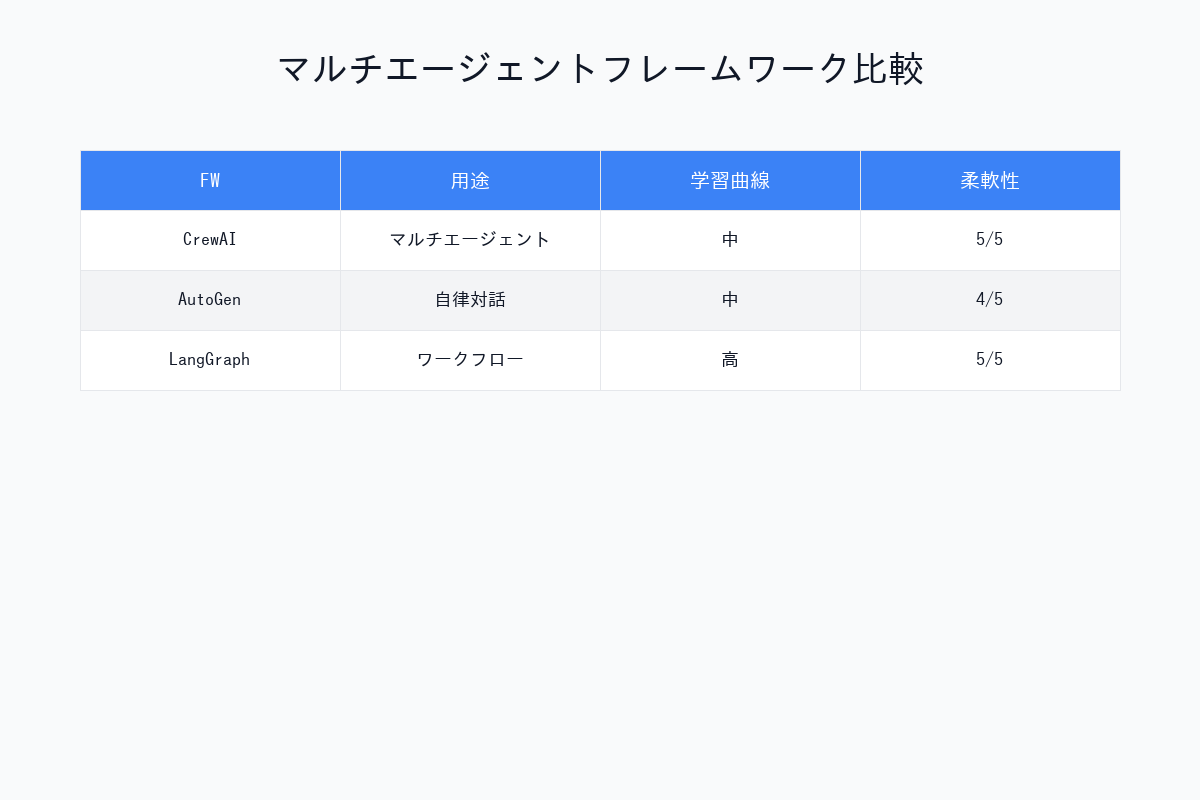
CrewAI vs LangGraph vs AutoGPT
| 項目 | CrewAI | LangGraph | AutoGPT |
|---|---|---|---|
| 学習曲線 | 緩やか | 急峻 | 緩やか |
| 柔軟性 | ⭐⭐⭐⭐ | ⭐⭐⭐⭐⭐ | ⭐⭐⭐ |
| 本番運用 | ⭐⭐⭐⭐⭐ | ⭐⭐⭐⭐ | ⭐⭐ |
| コミュニティ | 10万人+ | 5万人+ | 50万人+ |
| 企業採用 | 60% Fortune 500 | 20% | 5% |
まとめ:CrewAIを使うべき人
今すぐ使うべき人
- コンテンツ制作者: 記事自動生成
- カスタマーサポート: 問い合わせ自動化
- データアナリスト: レポート自動作成
- 開発者: 複雑な自動化タスク
学習リソース
- 公式ドキュメント: https://docs.crewai.com
- GitHub: 3,000+ Stars
- Discord: 5万人のコミュニティ
- 認定プログラム: 無料の公式トレーニング
CrewAIは、マルチエージェントAI開発の未来を切り開いています。複雑な業務を自動化し、生産性を10倍以上に高める強力なツールです。
画像生成プロンプト集(DALL-E 3 / Midjourney用)
プロンプト1:マルチエージェント協力図
Diagram showing multiple AI agents collaborating: Researcher, Analyst, Writer, Editor working together on a document. Each agent represented by distinct icon/avatar, arrows showing workflow. Modern AI collaboration visualization, blue and purple gradient, teamwork concept.
プロンプト2:CrewAIアーキテクチャ
Technical architecture diagram of CrewAI framework showing Agents, Tasks, Tools, and Crew structure. Hierarchical layout with connecting lines showing relationships. Clean software architecture style, boxes and arrows, professional documentation aesthetic.
プロンプト3:ワークフロー実行プロセス
Flowchart visualizing CrewAI execution process: input → Agent 1 (research) → Agent 2 (analysis) → Agent 3 (writing) → Agent 4 (editing) → output. Sequential process with icons for each stage. Modern process diagram style, flowing arrows, color-coded stages.
プロンプト4:自動記事生成システム
Infographic showing automated content generation system powered by CrewAI: topic input → research agent gathering info → writer agent creating draft → editor agent polishing → published article. Content production pipeline visualization, magazine/publishing aesthetic.
プロンプト5:CrewAI vs 他フレームワーク比較
Comparison chart showing CrewAI, LangGraph, and AutoGPT with key metrics: ease of use, flexibility, production-readiness, community size. Radar chart or bar chart style. Professional tech comparison infographic, clean data visualization, blue theme.
著者について
DX・AI推進コンサルタント
大手企業グループのDX推進責任者・顧問CTO | 長年のIT・DXキャリア | AWS・GA4・生成AI活用を専門に実践ノウハウを発信中
#CrewAI #マルチエージェント #AI自動化 #エージェントシステム #協調AI
最終更新: 2025-11-16
この記事を書いた人
NL
nexion-lab
DX推進責任者・顧問CTO | IT業界15年以上
大手企業グループでDX推進責任者、顧問CTOとして活動。AI・生成AI活用、クラウドインフラ最適化、データドリブン経営の領域で専門性を発揮。 実務で培った知識と経験を、ブログ記事として発信しています。
AI・生成AIDX推進顧問CTOAWS/GCPシステム開発データ分析
詳しいプロフィールを見る